Ask Claude, ChatGPT, or another AI assistant to search, save, plan, and share your places.
 Searched places in ikutoco
Connection URL
ikutoco supports MCP (Model Context Protocol). Add this URL to your AI assistant to connect.
https://ikutoco.com/mcp
Available on the Pro plan. On the Free plan, requests from the AI are declined. The same limits apply as in the app, such as how many places you can save.
How to connect
This is just an example of the flow. Where you add a connector, the exact steps, and which plans and countries can use it differ between AI assistants and may change. For details, see your AI assistant's help.
- 1
Add the connection URL to your AI assistant
In Claude, ChatGPT, Gemini, Grok, or another AI assistant, open the screen for adding a connector (MCP server) and enter https://ikutoco.com/mcp. No keys or API tokens needed.
- 2
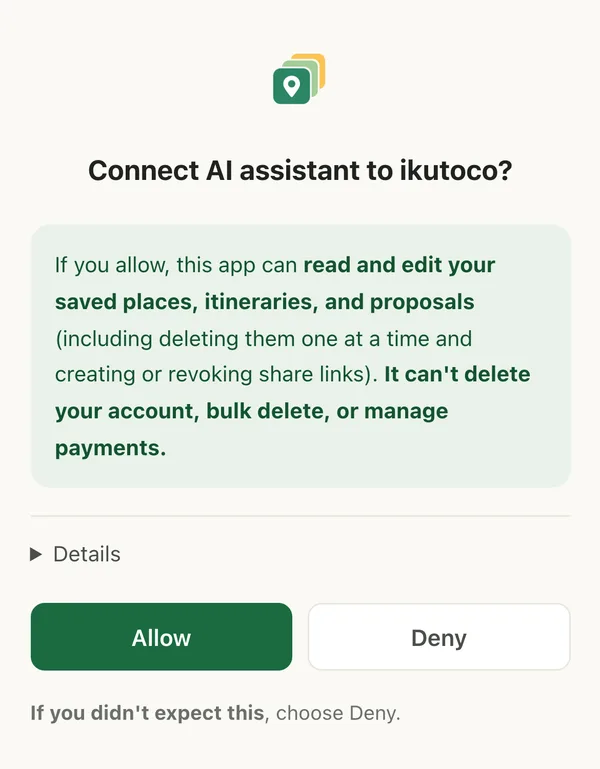
Sign in and allow access
A browser window opens. Sign in with the Google or Apple account you use for ikutoco, read the details, and tap Allow.
- 3
Ask in your own words
That's it — just ask. Anything it creates shows up in ikutoco right away.
- “Find the cafes I saved in Kamakura”
- “Build an itinerary with these 3 places”
- “Make a proposal with plans A and B and create a share link”
What you can and can't ask for
- Search, save, and edit places (including previewing a link to pick a thumbnail)
- Build and edit itineraries and proposals, and preview what others will see
- Create and revoke share links, and rename tags
- Delete places, itineraries, and proposals one at a time
Only in the app: deleting your account, bulk deleting or importing places, subscribing or canceling, uploading your own images, actions on shared pages, and sending contact messages. The AI also can't read your email address.
Things to keep in mind
- Deleting, revoking share links, and renaming tags can't be undone. Whether the AI asks before doing them depends on the assistant.
- If the permission screen shows a warning box and you don't recognize the destination, close it without allowing access.
- The connection expires 30 days after you last use it. Just connect again the same way.
Once you allow the connection, your saved places and itineraries are sent to the AI service you use (what's sent depends on what you ask it to do). How it's handled there is governed by that provider's terms. For how ikutoco handles your data, see the Privacy Policy.